
ChackTok -Photobooth Event App
360 photo boothPhotography
4.461.00 Reviews
- Version
- 1.9.5
- Installs
- 100.00K
- Age Rating
- Teen
Screenshots
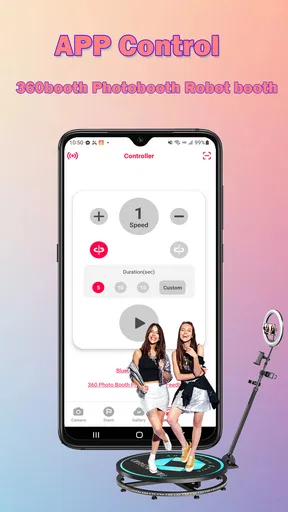
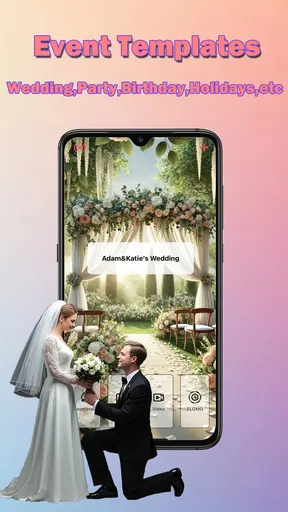
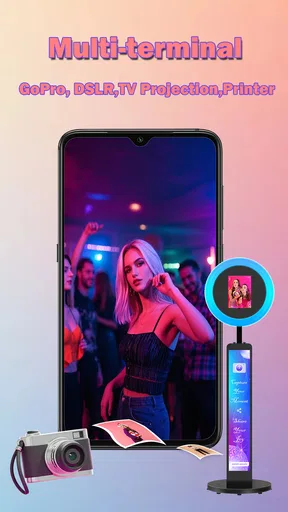
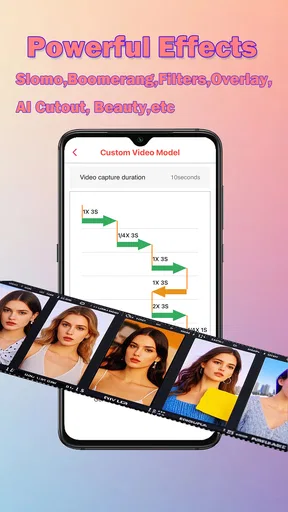
Our Review of ChackTok -Photobooth Event App
 Analysis by Appyee
I think a 360 photo booth works best when it feels less like a gadget guests have to figure out and more like a small, well-run part of the event. That is the lens I’d use for ChackTok - 360&ipad photobooth: not simply as a camera app, but as a creative tool for preparing an experience, capturing a moment, and getting the result into people’s hands. Its appeal is clearest when you already have a specific event in mind and want the photos to feel connected to it.
Start with the event, not the effects
Before opening the app, I’d decide what guests should take away: a playful clip from a birthday, a keepsake from a wedding, or a branded moment at a business gathering. That choice helps guide the template and visual direction, rather than leaving you to improvise while a line of guests waits. The app is in the photography category, and its focus on 360 and iPad booth work gives it a more event-centered purpose than a typical camera app built for spontaneous personal snapshots.
That distinction matters. A regular phone camera is usually the easier choice if you only need a few pictures, while a 360 booth is about turning the capture itself into an activity. I’d choose this app when the booth is meant to draw people in and produce a consistent style of output. I would not set it up just to replace everyday camera use; its value depends on having a booth, a gathering, and a reason to make the images feel like part of the occasion.
Build a practical booth workflow
The app is made by 360 photo booth and is described as an all-in-one option for 360 and iPad booth sessions, with templates, event tools, and sharing. That combination points toward a useful workflow: make the visual choices before guests arrive, keep the capture process simple, then let people receive or share the results while the event is still happening. In my view, preparation is the difference between a booth that feels smooth and one that becomes another task for the host.
For a realistic example, imagine setting up at a family birthday. I’d settle on a look that suits the celebration before the first guests arrive, check that the iPad and booth arrangement are ready, and have one person nearby to explain where to stand and when to move. That last part is easy to overlook: even a clear app cannot replace a human cue when several people are excited to jump in at once. A short test with the actual setup can also reveal whether the background, movement, and available space work together.
There is a trade-off in the all-in-one approach. Keeping templates, event preparation, and sharing in one place can be more convenient than stitching together a camera app, an editor, and a separate delivery method. But an event workflow still needs an operator who can keep the experience moving. If you are planning a quiet gathering and do not want to supervise a station, taking ordinary photos and sharing an album afterward may be simpler.
Make changes with a purpose
Creative options are most useful when they reinforce the event instead of competing with the people in the frame. I’d use a template or visual treatment to make the booth output feel recognizable, then keep extra decoration restrained. That approach is especially helpful for a business event: a subtle, consistent design can make each result feel connected to the occasion without turning every photo into an advertisement.
When you are choosing a look, think about the finished image on a guest’s phone, not only how it appears while you are editing. Text and decorative elements can be fun, but they may crowd a group shot or cover details that make the moment personal. I’d test a sample with different numbers of people and different poses before settling on a layout. This is a practical way to catch a design that works for one person but becomes cramped when a whole group joins in.
For repeat use, I’d also keep a simple note of which visual choices worked and which caused confusion. That is not glamorous, but it saves time at the next event and helps you make deliberate changes rather than rebuilding the look from scratch. The strongest use of editing is not adding every available effect; it is making the result feel finished while preserving the moment guests came to capture.
Sharing is part of the experience
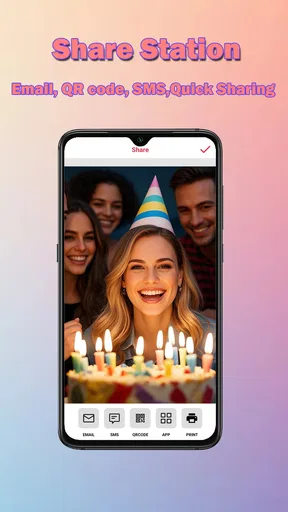
Instant sharing can make a booth feel rewarding because guests do not have to wait until the event is over to see what they made. It also changes the host’s job: someone should be ready to help if a guest is unsure how to receive or share a result. I would think through that handoff before the event, especially if the booth will be busy, so the capture area does not become a bottleneck.
There is a useful choice here between speed and control. Letting guests share right away makes the experience lively, while a more deliberate handoff gives the host a chance to check that the result looks right and suits the event. For a private family party, immediate sharing may be the fun option. For a company gathering, I’d be more selective about the visual treatment and the flow of delivery, so the booth feels polished rather than improvised.
Why ChackTok Stands Out
At first glance, you might be thinking, "Oh, just another photo booth app," but trust me, ChackTok - 360&ipad photobooth is anything but ordinary. It's designed to bring that wow factor to your events with its unique 360-degree photo capabilities. Imagine spinning around in style while the app captures every angle—it’s like your own personal paparazzi!
Features That Make It Pop
Let’s talk features because this app is packed with them. First off, the 360-degree photo capture is just the beginning. You can use your iPad to create customizable backgrounds, making every photo session tailored to your event’s theme. Plus, the app offers real-time editing tools, so you can tweak your photos on the fly. It’s perfect for those who want to ensure every shot is Insta-worthy.
Another cool feature is the sharing capability. Once you've snapped your epic photos, you can instantly share them on social media or send them directly to your friends and family. This instant gratification is a game-changer, especially for those of us who love keeping everyone in the loop.
Ease of Use
Now, let’s chat about the user experience because nobody wants to spend hours trying to figure out how to use an app. Thankfully, ChackTok nails it here. The interface is super intuitive, so even if you're not a tech wizard, you'll have no trouble getting it up and running. Setup is a breeze, and you’ll be snapping those 360-degree shots in no time.
Whether you're hosting a birthday party, wedding, or corporate event, the app guides you through every step with clear instructions. It’s like having a friendly assistant by your side, making sure everything goes off without a hitch.
Creative Possibilities
Let’s not forget the creative possibilities. With ChackTok, you can unleash your inner artist by playing around with different filters, overlays, and effects. Want to add some text or stickers? Go for it! The app makes it easy to personalize every photo to fit the vibe of your event. It’s not just about taking pictures; it’s about creating memories that are as unique as the people in them.
Plus, the app’s support for various devices means you can use it with whatever gear you have on hand. Whether you’re working with an iPad, iPhone, or other compatible devices, you’re all set to capture those unforgettable moments.
Final Thoughts
In a world where everyone is vying for the best social media content, ChackTok - 360&ipad photobooth sets you apart by offering a unique, fun, and easy way to capture memories. It’s more than just a photo booth app; it’s a tool for creativity and connection. Whether you're an event planner, a business owner, or just someone who loves hosting parties, this app is a fantastic addition to your toolkit.
So, next time you’re planning an event and want to add a little flair, give ChackTok a whirl. Trust me, your guests will thank you, and your social media feed will never look better!
Who will get the most from it?
I’d recommend this app to people who expect to run a booth more than once: event planners, venue teams, photographers expanding into interactive experiences, and hosts who enjoy managing the details. The free download makes it possible to explore the app before committing to a paid setup, although in-app purchases range from $24.99 to $599.99 per item. That is a broad span, so I’d check what a particular purchase includes and whether it fits the events you actually handle before spending.
It is less compelling for someone who only wants a filter for casual selfies, or for a host who would rather leave photography entirely to guests’ phones. Those alternatives are less involved and often need no dedicated station. The booth format earns its place when a shared activity and a recognizable result matter more than simply collecting pictures.
Plan around the real room
A useful, easily missed step is to treat the booth as part of the room layout, not just as an app session. Guests need enough space to gather and move comfortably, and the operator needs a clear view of the station. I’d avoid placing it where people naturally queue for food or cross between activities. A good position can make the experience feel inviting; a bad one can create congestion regardless of how polished the template looks.
It also helps to decide who is responsible for the station during the event. If the host is busy greeting people, a second person can keep the line moving, offer simple instructions, and help with sharing. That does not mean the app is difficult; it is simply a practical distinction between an easy interface and an event that runs itself. For a small gathering, one attentive host may be enough. At a larger function, assigning the task in advance is the safer plan.
Check the fit before you commit
ChackTok is free to install, has a 4.3 average from around 500 ratings, and has been installed over 100,000 times. It is rated Teen, and version 1.9.5 requires Android 9 or later. Those details make it easier to judge whether it suits your device and audience, but they do not replace a practical rehearsal. I’d try the complete capture-to-sharing flow before an event, rather than only opening the app and browsing its controls.
That rehearsal answers the questions that matter most: does your chosen setup work comfortably in the room, can the operator keep the session moving, and does the result look right when shared? If your plan depends on a specific booth arrangement or a particular visual style, test that exact combination. I would not assume that a quick glance at the interface proves an event-ready workflow.
My creator verdict
For me, the strongest case for ChackTok is its focus on turning 360 booth use into a prepared, shareable event activity, rather than treating it as ordinary phone photography. Templates and event-oriented tools can help give a session a coherent look, while sharing makes the result useful to guests beyond the moment itself. The app’s real value comes from planning the whole path from setup to handoff.
I’d choose it when I had a suitable booth, a clear event purpose, and someone ready to oversee the station. I’d choose a standard camera app or a conventional photo-sharing workflow when convenience mattered more than the booth experience, or when I had no space or time to manage one. That is the honest dividing line: ChackTok can make a gathering more interactive, but it works best as one part of a thought-through event, not as a shortcut to effortless photography.
Verdict
Strengths of ChackTok -Photobooth Event App
- Intuitive interface for easy navigation.
- High-quality 360-degree photo capture.
- Seamless integration with social media.
- Customizable templates for branding.
- Supports both Android and iOS devices.
Limitations of ChackTok -Photobooth Event App
- Requires high-performance device for best use.
- Limited editing options in free version.
- Occasional lag with large file sizes.
- In-app purchases for premium features.
- Heavy battery consumption during use.
Similar Picks in This Category
View All
Google Photos
Google LLC4.4

Gallery
Google LLC4.2

Picsart AI Photo Editor, Video
PicsArt, Inc.3.9

B612 AI Photo&Video Editor
SNOW Corporation4.1

BeautyPlus-Selfie Photo Editor
PIXOCIAL TECHNOLOGY (SINGAPORE) PTE. LTD.4.5

Remini - AI Photo Enhancer
Bending Spoons4.1
Frequently Asked Questions
What is ChackTok - 360&ipad photobooth?
ChackTok is an innovative photo booth app designed for both Android and iOS devices. It allows users to capture 360-degree photos and videos using an iPad, providing a unique and interactive experience. Ideal for events, it offers customization features and easy sharing options, making it perfect for parties and gatherings.
How does the 360-degree photo feature work in ChackTok?
The 360-degree photo feature in ChackTok utilizes your device’s camera to capture a complete panoramic view. By simply rotating your device or using a compatible stand, you can capture stunning, immersive images that can be shared directly from the app. This feature is great for capturing special moments from every angle.
Is ChackTok - 360&ipad photobooth user-friendly for beginners?
Yes, ChackTok is designed to be user-friendly, with an intuitive interface that guides users through the process of capturing and editing photos and videos. Even beginners can easily navigate the app, thanks to its simple controls and helpful tutorials that ensure everyone can create professional-quality content.
What customization options are available in ChackTok?
ChackTok offers a variety of customization options, including filters, frames, and stickers to enhance your photos and videos. You can also add text and adjust the lighting and contrast to suit your preferences. These features allow users to personalize their content and create unique, memorable keepsakes.
Can I share my photos and videos directly from ChackTok?
Absolutely! ChackTok provides seamless sharing options, allowing you to share your creations directly to social media platforms like Instagram, Facebook, and Twitter. You can also save your photos and videos to your device or send them via email or messaging apps, making it easy to share your memories with friends and family.
